


STEP 1
Opt in to the University's Copilot for M365 program.
Opting in to Copilot for M365 is required to access Cowork. Until you have opted in, Cowork will not appear for your account.
Where standard Copilot summarizes and suggests, Cowork can take multi-step action on your behalf—producing finished Word, Excel, and PowerPoint files; sending email; scheduling meetings; and building research reports, always working inside your University of Miami Microsoft 365 tenant and permissions. Before you begin using Cowork, please review the environment, credit policy, and responsible-use expectations below; they include both enhanced capability and important considerations for responsible use in a research and healthcare setting. Copilot's Cowork extends Copilot for Microsoft 365 (M365)* from a chat assistant into a hands-on collaborator.
*Access to Cowork at the University of Miami is tied to our Copilot for M365 opt-in program. If you haven't done so already, please opt-in first.
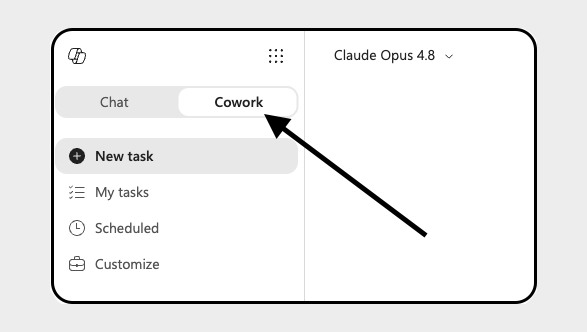
Access the Copilot Cowork agent online via this link:
m365.cloud.microsoft/agents/cowork
Trying to access the Cowork Agent via the M365 Copilot desktop application? Visit Microsoft's Copilot download page to get the desktop app. Within the M365 Copilot desktop app, search for or select "Cowork" from the list of agents.
Quick Links: Capabilities - Getting Started - Policies - Responsibilities - Best Practices - Scenarios - Resources
Opt in to the University's Copilot for M365 program.
Opting in to Copilot for M365 is required to access Cowork. Until you have opted in, Cowork will not appear for your account.
Confirm your license and eligibility.
Once opted in, please allow 1-3 business days for your account to be provisioned with the appropriate Copilot for M365 license. Cowork inherits your existing University permissions; it can only reach the files, mail, and data you already have access to.
Review the environment, credit, and responsible-use policies.
Read the University-specific policies below, the monthly credit cap and responsible-use expectations, before you begin working with Cowork.
Launch Cowork and start working.
Open Cowork from Microsoft 365 and describe what you need in plain language. Cowork will take it from there and check with you before any action leaves your tenant.
You must first opt-in to the University's Copilot for M365 program before Cowork becomes available to you.
All Cowork users are currently allocated a cap of 25,000 credits per month, consumed as Cowork completes work on your behalf.
The 25,000-credit cap is not fixed. The University may adjust it up or down based on usage, capacity, and program needs.
Cowork is capable of acting on your behalf, so responsible use matters, especially in a research and healthcare environment. As a Cowork user, there are certain expectations:RESPONSIBILITIES & RISKS
Using Cowork Responsibly
Your Responsibilities:
Potential Risks:
Be specific.
Keep sensitive data out.
Review before you act.
Mind your credits.
Cowork shines when a task involves doing work across your Microsoft 365 apps. For simpler needs, standard Copilot or Copilot Chat may be all you need. Draft a report, deck, or spreadsheet from scratch Yes Cowork produces finished, editable files. Summarize a meeting and extract action items Yes, but check whether a simpler tool suffices first Works from Teams meeting transcripts. Manage inbox, calendar, and scheduling Yes Drafts, sends, and books on your behalf with your approval. Quick fact or one-line answer Not needed Standard Copilot for M365 is faster and lighter. Work involving PHI or other regulated data Only with approval Requires review and explicit approval under University policy. Deep-research capability verifies and cites sources. Departmental or experimental use Check whether a simpler tool suffices first.SCENARIOS
When to Use Cowork
Scenario
Use Cowork?
Notes
Multi-source research with citations
Yes
Maybe
The University of Miami's Cowork offering is evolving, and we update this online guide regularly. Please check back often for new features, training, and enablement. If you have any questions, reach out to ai@miami.edu.RESOURCES
Learn More & Get Help
Coming Soon — Training & Enablement:
